
Submitting Time to EdPros
For Statement of Work – Support Request that are based on an hourly rate, we require our Experts to submit their time via our portal. There are two main steps to the process:
1. Entering and Sending Your Timesheet
Go to: https://www.edpros.co/contractortimesheet. You will be prompted to enter a password.
You can also navigate to this page by going to www.edpros.co and hovering over “For Experts” and then selecting “Submit Your Time”
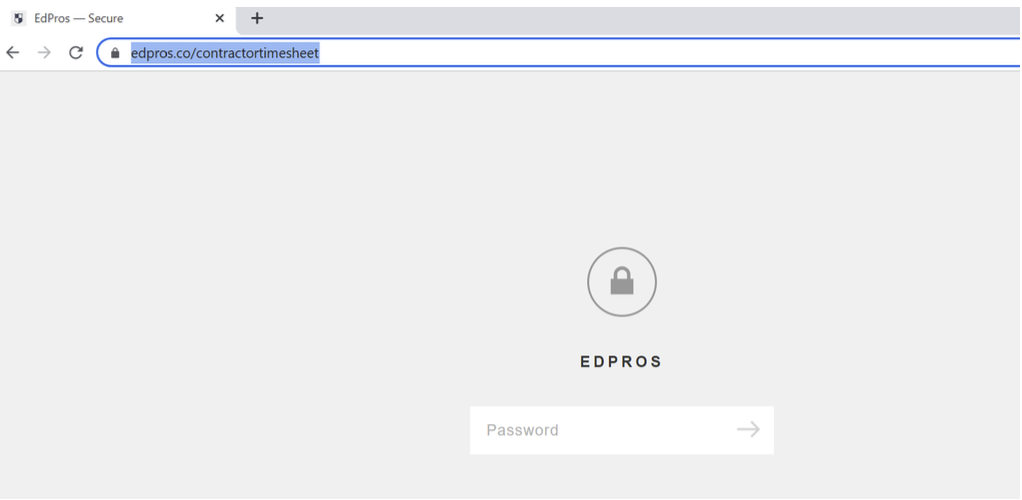
Password is TimeIsMoney (please follow the capitalization) and click Enter .
If password does not work, please reach out to glaser@edpros.co.
This password is subject to change, and when it does, you will be notified to the email we have on file.
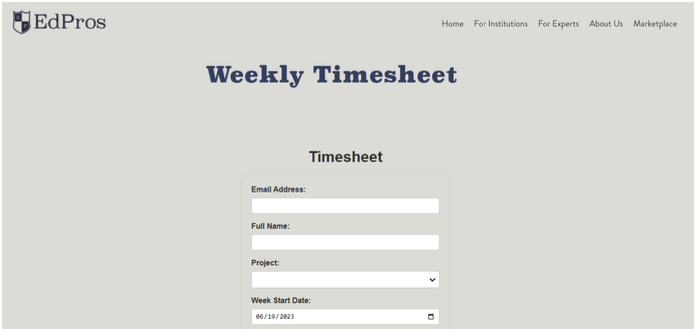
You are now in the Weekly Timesheet report.
Please complete all the fields and click “Submit”.
Please note: be sure to use the email you used in the Statement of Work and drives the Project options available. If this email changes, please email Yoni Glaser (glaser@edpros.co) to update the records.
You will be receive a pop up notification saying “Thank you for submitting your time! Timesheet has been submitted successfully”
2. EdPros reviews and notifies of Timesheet status
EdPros will review the received timesheet within the agreed-upon timeframe (usually 2 business days). If approved, you will receive an email from glaser@edpros.co that looks like the below:
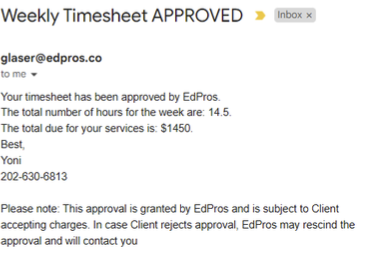
Note: This approval is granted by EdPros and is subject to Client accepting charges. In case Client rejects approval, EdPros may rescind the approval and will contact you.